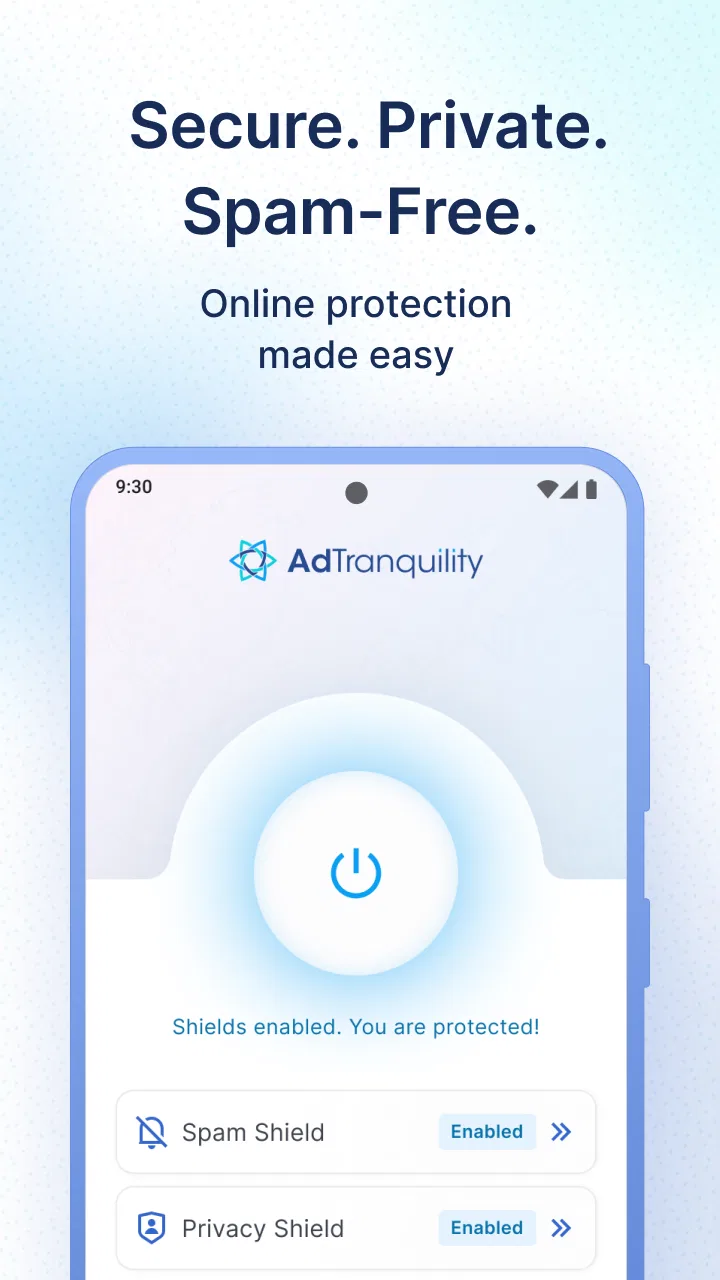
AdTranquility VPN Spam Blocker
- 4.6
- Rating
- 1.00M
- Installs
- Free
- Price

 Analysis by App-foxy
I spent time with AdTranquility VPN Spam Blocker as a practical Android tools app rather than treating it like a one-tap miracle. Its appeal is easy to understand: it combines VPN-style protection, proxy access, and notification pop-up blocking in one free app. That makes it interesting for anyone who wants a cleaner phone experience without installing several separate utilities. My overall impression is that it is most useful when the main annoyance is intrusive notification clutter, while its VPN role needs a little more careful expectation-setting.
The app is developed by Leverage Technologies Social Media LLC and has built a sizeable audience, with more than a million installs, an average rating of 4.6, and roughly 48 thousand ratings. Those figures suggest that the basic idea works for many people, but they should not be read as a promise that every connection or device will behave identically. VPN performance is affected by the network you are using, the distance to the service endpoint, and what else your phone is doing at the same time.
How AdTranquility feels in everyday use
I focus on the small routines that make a combined VPN and notification tool easier to judge: checking its connection after a network change, then noticing whether the alerts you care about still get through. That helps separate a genuinely useful calmer phone from one that is simply quieter. From there, the next section turns to the practical question of how to fit AdTranquility into a normal day without relying on it blindly.
You May Also Like

 Blood Strike: 2.5 Anniversary
Blood Strike’s Loadouts Turn Every Drop Into a Tactical Gamble
A close look at Blood Strike’s custom loadouts: how fast access to signature weapons reshapes its battle royale rhythm, rewards preparation, and narrows the gap between fights.

 Pandora - Music & Podcasts
Pandora’s Music Is Easy to Start, but Harder to Recover
Pandora’s strength is its low-effort path from a seed to a station. Its weak spot is how much confidence it asks you to place in connection, setup, and quiet recovery.

 8 Ball Pool
 Is Built on Rivalries, Rematches, and Routine
A close look at the rivalries, rematches, shared routines, and unanswered safety questions that turn a quick pool match into a persistent mobile community.

 Samsung Music
’s Quiet Strength Is Playing What You Already Own
Its reach comes less from spectacle than from dependable access to a personal library. That simplicity is both the app’s strongest retention engine and its ceiling.

 AccuWeather: Weather Radar
AccuWeather Review: A Quick, Clear Forecast for Everyday Decisions
For everyday plans, the best forecast is the one you can understand quickly. AccuWeather makes rain timing, radar, and local conditions easy to act on, with a few trade-offs.

 Hill Climb Racing
Why Hill Climb Racing Still Turns Crashes Into One More Run
A tiny car, a bumpy hill and one more upgrade: Hill Climb Racing keeps resurfacing because its simple chaos makes every near-miss feel personal.
More From Our News Desk



Speed expectations before you connect
The first thing I would tell a friend is not to judge this app solely by the word “VPN.” A VPN can improve privacy on an untrusted network, but it also adds another step between the phone and the internet. In practical terms, that can mean a website takes longer to open, a video needs more time to settle, or an online service reacts less quickly. AdTranquility is best approached as a convenience and protection tool, not as a guaranteed way to make every connection faster.
For ordinary browsing, messaging, reading, and checking lightweight apps, the experience is likely to feel more forgiving than it would during demanding online activity. The app’s value is especially clear when notification pop-ups are breaking your concentration. Instead of repeatedly dismissing interruptions, you can use its blocking focus to make the phone feel calmer. That benefit is not measured in connection speed, but it can make the device feel faster because you spend less time dealing with distractions.
I would avoid making a firm promise about streaming quality or gaming latency. Those activities are sensitive to even small changes in responsiveness, and a VPN connection can introduce variability. If a game already struggles on your mobile network, adding a VPN layer may not solve the problem and could make the delay more noticeable. For a quick search or a short session on public Wi-Fi, the trade-off may be worthwhile; for competitive play, I would test carefully before relying on it.
One useful habit is to compare the same task with the VPN active and inactive, using the same network and roughly the same time of day. Open a few familiar pages, send a message, and check whether notifications behave the way you expect. This simple comparison tells you more about your own phone than a generic speed claim ever could. It also helps you decide whether the privacy and pop-up reduction are worth any slowdown you notice.
What happens during heavier use
Light browsing is only part of the story. The more revealing test is what happens when the phone is already busy: a large download is running, several apps are open, the battery is low, and the network signal is changing. In that situation, a VPN tool has to coexist with the rest of the system. Even when the app itself feels straightforward, the phone may have less room for background networking and notification management.
My practical advice is to activate it before a task that matters, rather than switching it on halfway through a sensitive session. Starting a connection before opening a banking page, signing into an account, or joining public Wi-Fi gives you a clearer picture of whether the connection is ready. It also avoids the awkward moment when an existing page or app has to reconnect after the network route changes.
AdTranquility makes more sense for a commuter who checks email and browses on café Wi-Fi than for someone who expects uninterrupted high-bandwidth use all day. A commuter can tolerate a brief reconnection or a page that loads slightly later, while a person watching long streams or transferring large files may notice every interruption. That distinction is important because the app’s strongest everyday benefit is control over the phone’s environment, not raw network performance.
Notification blocking can also change how heavy use feels. When several apps are active, pop-ups can appear at exactly the wrong moment, covering controls or pulling attention away from a task. Reducing that noise is valuable during reading, navigation, or work. Still, I would review the result after enabling the feature. A blocker that is too aggressive can hide a useful delivery update, security warning, or message that you genuinely wanted to see. The right setup is selective calm, not total silence.
Stability and recovering from interruptions
A reliable tool is not one that never encounters a network change; it is one that gives you a manageable way back when the change happens. Mobile connections move between Wi-Fi and cellular data, and public networks can require extra sign-in steps. If the VPN stops during one of those transitions, the sensible response is to check the app rather than assuming all traffic is still protected.
I recommend treating the connection indicator as a status check before using an account or sending something private. This is a small step, but it prevents a common mistake: enabling a VPN once and then forgetting that the connection may have been interrupted later. If a page refuses to load, the first recovery attempt should be simple—pause and reconnect, then retry the page. If that does not help, temporarily disconnecting can show whether the VPN route is the cause.
That recovery workflow is also useful when a service behaves strangely. Some websites and apps do not like traffic coming through a proxy or VPN, and they may ask for another verification step or refuse the connection. In those cases, AdTranquility is not necessarily broken. The route itself may be incompatible with the service. A practical user should be comfortable switching the VPN off for that particular task, then turning it back on afterward when appropriate.
I would not leave any VPN app running blindly just because it is available. Check it after entering a different network, after the phone wakes from a long idle period, and whenever an important app suddenly loses access. These checks are especially worthwhile on a phone that frequently changes between home Wi-Fi, work Wi-Fi, and mobile data. They take only a moment and make the protection feature much more dependable in real life.
Device limits and Android compatibility
The current version is 2.1.5, and the app supports Android 8.1 or later. That gives it a reasonably broad place on Android phones, including devices that are not among the newest models. The age rating is Everyone, so the presentation is intended to be suitable for a general audience rather than a specialized technical crowd.
Older phones deserve a more cautious approach. A device with limited storage, a tired battery, or many background apps may feel the effect of any persistent network utility more than a modern phone does. I would install it on an older handset only after checking whether the phone already has trouble keeping apps active. If the system frequently closes background processes or struggles with basic multitasking, adding VPN and notification duties may increase friction even if the app itself is not demanding.
Battery behavior is another reason to observe rather than assume. Keeping a network connection managed in the background can use more resources than leaving the phone completely alone, although the real effect depends on network quality and how often the connection changes. A weak signal can be particularly troublesome because the phone is already working harder to maintain communication. If battery life suddenly becomes a concern, compare a normal day with the VPN enabled and another similar day without it.
There is also a usability limit. People who want detailed server controls, extensive diagnostic information, or highly configurable routing may find a simple tools app less satisfying than a dedicated VPN service. AdTranquility is appealing because it brings several everyday functions together, but that convenience may come at the expense of specialist control. If you need to fine-tune every aspect of a connection, you should look for an option designed around advanced networking rather than notification cleanup.
Where the app fits beside usual alternatives
The usual alternative is to use a standalone VPN app and handle notification control through Android’s own settings. That route can be better for someone who wants one carefully chosen privacy product and prefers to keep unrelated functions separate. Android’s notification controls may also be enough if your goal is simply to silence a particular app or category.
AdTranquility is more attractive when you want a single place to address both problems. A person who is tired of pop-up interruptions and occasionally uses public Wi-Fi may appreciate not having to manage separate tools. The trade-off is that a combined app deserves more attention during setup and troubleshooting. When something changes, you have to identify whether the issue comes from the VPN connection, the proxy behavior, or notification filtering.
Compared with a browser’s private mode, AdTranquility serves a different purpose. Private browsing can reduce local browsing traces within that browser, but it does not replace a VPN or system-level notification management. Compared with a dedicated ad blocker, this app’s emphasis is not simply removing advertisements from web pages. Its more distinctive role is reducing unwanted notification pop-ups while offering a network privacy layer.
That combination makes it a good fit for a family member who wants a cleaner phone without learning several separate apps. It is less suitable for a network professional, a competitive mobile gamer, or someone who needs a clearly documented specialist VPN workflow. For those users, a dedicated alternative may provide better visibility and more predictable control, even if it does not include the same convenience features.
Small workflows that make a real difference
My preferred workflow is to use the app deliberately instead of leaving every option active without thought. Before connecting to public Wi-Fi, I would open AdTranquility, confirm the VPN state, and then use the network for ordinary browsing. Before starting a private task, I would check again, because a previous connection is not proof that the current one is still active.
For notification control, I would begin with the most disruptive sources rather than blocking everything immediately. If one shopping app or social app is responsible for most interruptions, start there and observe what changes. This approach preserves useful alerts while still delivering the calmer experience that makes the app worthwhile. It is a more practical setup than treating every notification as unwanted.
A second helpful workflow is to disconnect when troubleshooting. If a page, app, or login suddenly fails, turn off the VPN briefly and repeat the action. If the service works normally afterward, you have identified a compatibility issue rather than wasting time reinstalling the app. Once the task is complete, reconnect for the activities where you actually want the extra network layer.
I would also avoid testing performance while several unrelated variables are changing. Do not compare a strong home connection with a crowded public hotspot and then blame the app for every difference. Use the same location and network when possible, and note whether the problem appears only during Wi-Fi changes, large downloads, or certain services. That method gives you a useful personal profile of the app’s behavior.
Cost, version, and what to expect
AdTranquility is free to install, which lowers the barrier for trying its combined approach. The app also includes in-app purchase options ranging from $2.99 to $125.95 per item. Because those purchases can vary substantially, I would read each purchase screen carefully and avoid assuming that every useful function is included in the free experience. A free starting point is helpful, but it does not automatically mean every advanced option is free forever.
The app was released on October 16, 2019, and its current version is 2.1.5. For me, that makes it sensible to check how the installed version behaves on your particular phone rather than judging it by its age or by a single review. Android devices differ widely in background restrictions, battery management, and notification handling. A setting that feels effortless on one phone may require more attention on another.
Security-minded users should also keep their expectations grounded. A VPN can help when you do not want to use an open network directly, but it is not a substitute for strong account passwords, two-step verification, careful app choices, or sensible browsing habits. I would use AdTranquility as one layer in a broader routine, not as permission to ignore ordinary security precautions.
My performance verdict
After weighing the speed trade-offs, heavier-use behavior, recovery steps, and device considerations, I see AdTranquility as a useful convenience tool with a clear everyday audience. Its best moment is a phone that feels noisy and exposed on public networks: notification pop-ups are distracting, and you want a straightforward VPN option without assembling a toolkit from separate apps.
The strongest reason to try it is the combination of calmer notifications and occasional VPN protection, not a promise of faster internet. If that matches your needs, the free entry point makes testing easy. Begin with a short session on a familiar network, check how your important notifications behave, and compare a few normal tasks with and without the connection active.
I would skip it if you need specialist VPN controls, consistently low latency for competitive gaming, or a tool that can be left unattended without any status checks. I would also be cautious on an older phone that already has battery or multitasking problems. In those cases, a dedicated VPN or Android’s built-in notification controls may be a cleaner choice.
For everyone else, this is a sensible Android tools app to explore with realistic expectations. Leverage Technologies Social Media LLC has packaged several useful ideas into one place, and the result can make daily phone use less irritating. Just remember that reliability depends on the network and device around it. Used selectively, with occasional checks and a little troubleshooting, AdTranquility VPN Spam Blocker is more convincing as a practical privacy-and-distraction-control companion than as an all-purpose performance booster.
FAQs for AdTranquility VPN Spam Blocker
01What is AdTranquility VPN Spam Blocker, and how does it work?
AdTranquility VPN Spam Blocker is designed to combine VPN-style traffic protection with tools intended to reduce spam, unwanted connections, and potentially intrusive online activity. Depending on the platform and configuration, it may route traffic through a protected connection while filtering selected domains or requests. Before downloading, review the app’s description carefully because VPN coverage, filtering methods, and supported features can vary between Android and iOS versions.
02Does AdTranquility VPN Spam Blocker block all advertisements, spam calls, and unwanted messages?
The name may suggest broad spam protection, but users should not assume that every type of advertising or unwanted communication will be blocked. A VPN-based blocker generally focuses on internet traffic, such as websites, trackers, or known domains, rather than ordinary phone calls, SMS messages, or advertisements inside every application. Check the current feature list and permissions to understand exactly what the app can and cannot filter.
03Is AdTranquility VPN Spam Blocker safe to use for private browsing?
Using any VPN means that some network traffic may pass through the provider’s infrastructure, so privacy depends heavily on the company’s policies, security practices, and logging approach. Before installing AdTranquility VPN Spam Blocker, read its privacy policy and verify what information may be collected, how long it is retained, and whether data is shared with third parties. Avoid treating a VPN as complete anonymity or protection from every online threat.
04Will AdTranquility VPN Spam Blocker slow down my internet connection or drain the battery?
A VPN can sometimes reduce connection speed because traffic is encrypted and routed through an additional server. The effect depends on server distance, network quality, encryption settings, and the amount of filtering performed. Keeping a VPN active may also use more battery, particularly when switching between networks. In testing, users should compare browsing speed, video playback, battery usage, and stability with the service enabled and disabled.
05What permissions and subscriptions should I check before downloading the app?
Review the permissions requested during installation and setup, especially those related to VPN configuration, network access, notifications, or usage monitoring. A VPN permission is necessary for traffic routing, but unrelated or excessive requests deserve closer attention. Also check whether AdTranquility VPN Spam Blocker includes a free trial, recurring subscription, usage limits, advertisements, or in-app purchases. Confirm the renewal price and cancellation process before starting any paid plan.
Pros
- Blocks spam calls and messages before they disturb you.
- VPN-based filtering adds protection on public Wi‑Fi networks.
- Simple setup with minimal configuration required.
- Can reduce exposure to suspicious links and tracking domains.
- Useful for travelers needing safer connections on unfamiliar networks.
Cons
- VPN filtering may slightly reduce connection speed.
- Some websites or apps may require troubleshooting when filtered.
- Effectiveness depends on regularly updated spam and threat databases.
- A VPN profile must remain active for continuous protection.
- Advanced privacy features may require a paid subscription.

AdTranquility VPN Spam Blocker
Gallery